
1. How Do Single-table and Dual-table PCB Router Machines Work?
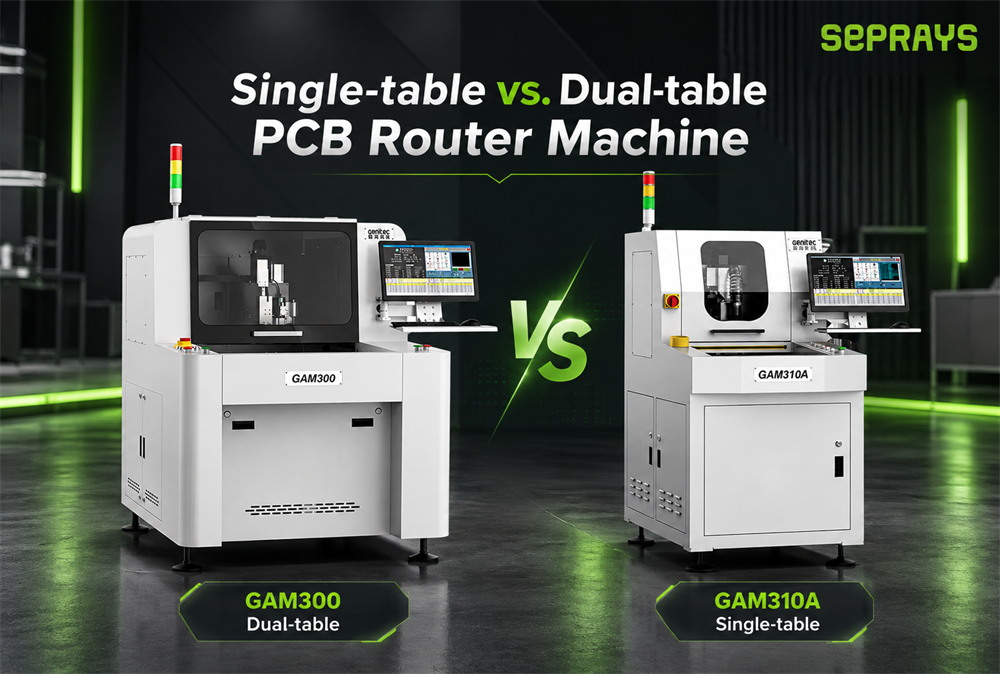
A single-table PCB router machine uses one main processing table. The operator loads the PCB, the machine completes positioning and routing, and the finished board is removed before the next PCB is loaded.
Loading → Positioning → Routing → Unloading → Next Loading
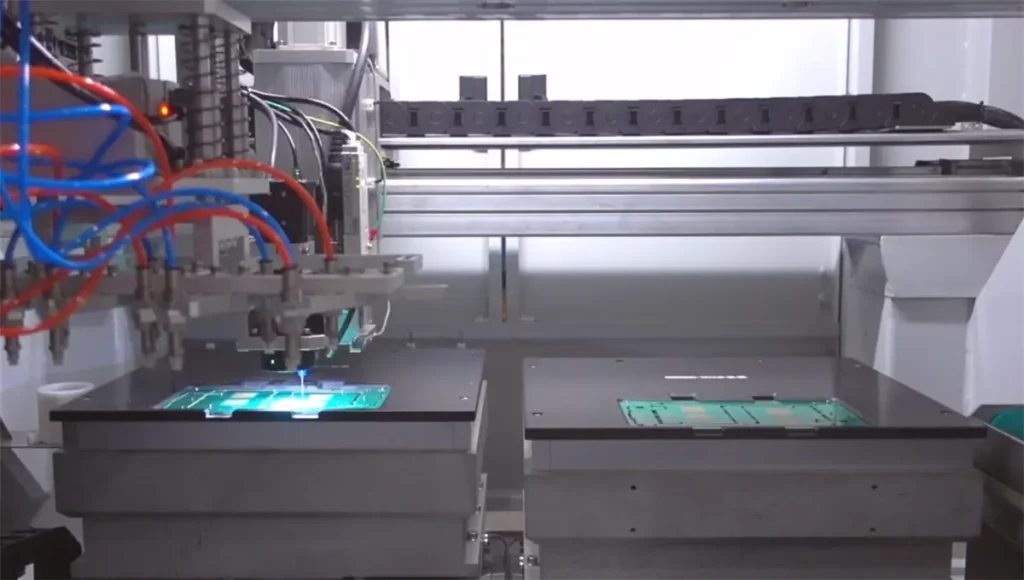
A dual-table PCB router machine uses two worktables that can operate alternately.
While Table A is routing a PCB, the operator can load, unload, or prepare the next PCB on Table B. Once routing is complete, the machine can switch to the other table.
Table A Routing + Table B Loading/Unloading → Table Switch
The main advantage of a dual-table design is not necessarily faster cutting speed, but the ability to reduce non-cutting waiting time.
2. How Much Difference Can Dual Tables Make to Production Efficiency?
The productivity difference usually comes from loading and unloading time rather than routing speed itself.
For example, suppose one PCB requires:
- 25 seconds for routing;
- 10 seconds for loading, positioning, and unloading.
With a single-table machine, the complete cycle may be approximately:
With a dual-table machine, part of the handling time can overlap with the routing process. While one table is being processed, the operator can prepare the next PCB on the second table.
This makes dual-table machines especially useful when loading and unloading take a noticeable amount of time or when production runs continuously for long periods.
However, if loading only takes a few seconds or production volume is relatively low, the actual productivity difference may be much smaller.
3. Which Production Scenarios Are Better for Single-table or Dual-table Machines?
| Production Condition | Single-table Machine | Dual-table Machine |
|---|---|---|
| Low-volume production | Suitable | Suitable |
| Continuous batch production | Suitable | More advantageous |
| Long loading/unloading time | More machine waiting | Handling can overlap with routing |
| Frequent model changeovers | More straightforward | Requires management of both tables and fixtures |
| Reducing machine idle time | Limited | More advantageous |
| Prototyping or process verification | Flexible | Also suitable |
For high-mix, low-volume production, a single-table configuration may provide enough flexibility. For stable batch production, especially where manual handling takes significant time, a dual-table configuration can improve equipment utilization.
4. Look at the Complete Cycle Time, Not Just the Number of Tables
When comparing single-table and dual-table PCB routers, the most useful number is the complete production cycle:
If routing represents only part of the total cycle, reducing handling and waiting time can make a noticeable difference.
This process-level view also reflects the broader direction of smart electronics manufacturing.
TheIPC-2591 Connected Factory Exchange (CFX)
standard focuses on information exchange across manufacturing processes and equipment, reinforcing the importance of evaluating production as a complete workflow rather than as isolated machine actions.
A dual-table configuration can be more valuable when:
- routing time is relatively short;
- manual loading takes longer;
- PCB positioning is more complicated;
- fixture opening and closing takes additional time.
On the other hand, if one PCB requires a long routing cycle but loading only takes a few seconds, the second table may have less impact on total output.
Can a dual-table configuration reduce the waiting time in your actual production process?
5. Product Changeover Frequency Also Matters
Table configuration should also be evaluated together with product mix.
If a factory produces many PCB models and frequently changes fixtures, programs, or positioning methods, total productivity may depend more on changeover time than on the number of worktables.
Typical changeover factors include:
- fixture replacement;
- program switching;
- first-piece inspection;
- operator setup;
- product verification.
In this type of high-mix production, a single-table machine can be easier to manage.
For products with longer production runs and fewer changeovers, a dual-table system can make better use of alternating loading and routing.
Stable batch production: cycle-time utilization matters more.
6. How Should You Choose the Right Table Configuration?
Three production data points are especially useful.
If routing time is already long, loading and unloading account for a smaller percentage of the total cycle.2. Loading and Unloading Time
If operators spend significant time loading, positioning, removing, or confirming each PCB, dual tables can reduce machine idle time.
3. Required Daily Output
If a single-table machine already meets the required output, a dual-table configuration may not be necessary.
The decision should be based on actual production data rather than simply assuming that more worktables automatically mean higher productivity.
7. Sample Testing and Cycle-time Measurement Are More Useful Than Specification Sheets Alone
The real productivity difference between single-table and dual-table PCB routers is best evaluated using the actual product.
During a sample test, it is useful to record:
- PCB routing time;
- loading and unloading time;
- vision alignment time;
- fixture opening and closing time;
- operator waiting time;
- average cycle time over 10–20 continuous production cycles.
This gives a much more realistic view of production capacity than comparing machine specifications alone.
SEPRAYS can provide PCB sample cutting and cycle-time evaluation.
By reviewing actual PCB samples, panel dimensions, target output, and production requirements, the engineering team can help determine whether a single-table or dual-table configuration is more suitable for the project.
8. Single-table vs. Dual-table PCB Router Machine: Selection Summary
A single-table PCB router is often suitable for moderate production volumes, frequent product changeovers, and applications where flexibility is important. A dual-table router is more useful when continuous production and overlapping loading/unloading can reduce machine waiting time.
The final decision should be based on routing time, loading time, product mix, and required output, rather than simply choosing the machine with more worktables.
If you already have PCB samples and a target cycle time, SEPRAYS can use actual cutting tests to help evaluate which table configuration better fits your production requirements.