

PCB/FPC Laser Machine
Strain Tester

Strain Tester

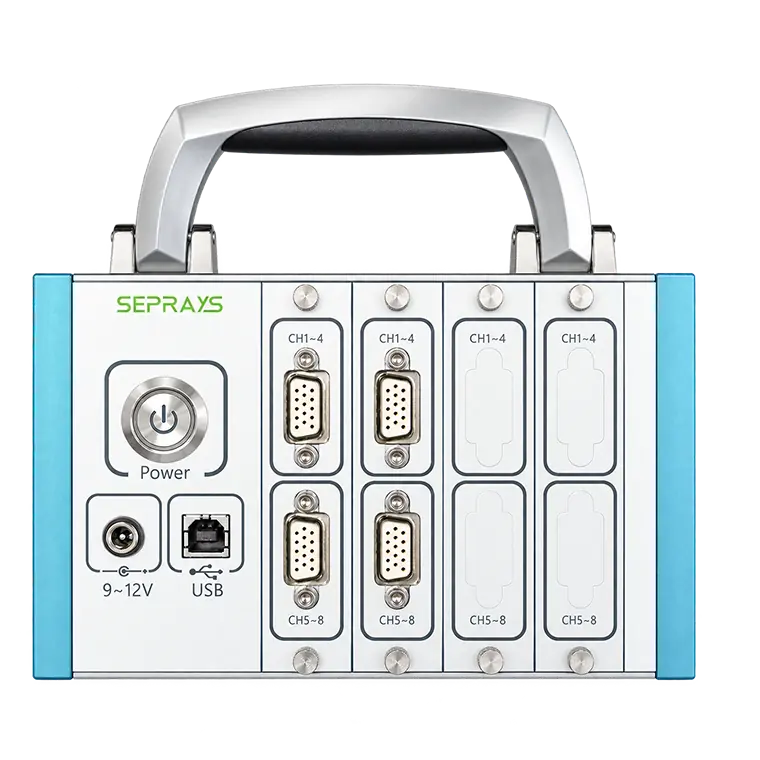
Worried about excessive PCB bending during depaneling, testing or assembly? The SEPRAYS Strain Tester is a portable PCB/PCBA strain measurement system that records board deformation and helps engineers identify processes that may damage solder joints and components.

  • 16, 24 and 32-channel models support simultaneous strain measurements at multiple locations.
  • Displays strain values, maximum and minimum principal strains, diagonal strain and strain rate.
  • Supports IPC-9704A-based analysis with configurable Pass/Fail evaluation.
  • Generates test reports with waveform records and PDF or Excel export.

Send us your PCBA drawings, testing process and required measurement points for a suitable Strain Tester configuration and quotation.

Get A Quote

Details

Product Details

    Overview

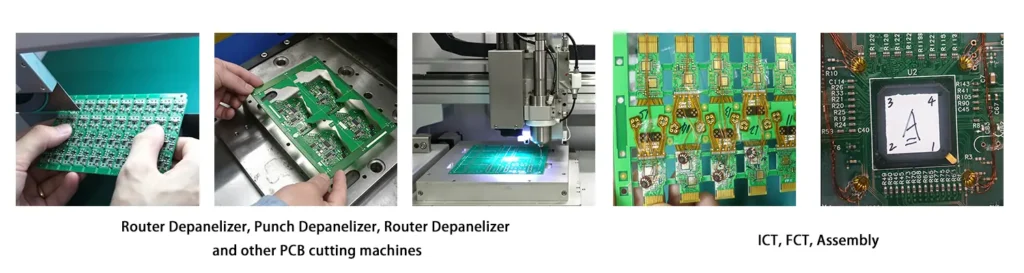
    The SEPRAYS Strain Tester is a portable data acquisition and analysis system for measuring mechanical strain on PCBs and PCBAs. By connecting strain gauges attached to critical board locations, it records deformation during depaneling, ICT, FCT and assembly, helping engineers evaluate process risks and verify equipment adjustments.

    Core Advantages

    High-Precision Multi-Channel Sampling

    Choose from 16, 24 or 32 analog input channels to match your measurement requirements. With 24-bit ADC resolution and sampling rates up to 10 kHz per channel, the system captures strain changes across multiple test points simultaneously.

    Automatic Analysis & Reporting

    The software records strain waveforms, displays measurement curves and supports data playback. It can generate reports with test results and Pass/Fail evaluations, while PDF and Excel export simplify documentation and comparison.

    Portable & Easy to Use

    The compact acquisition unit connects to a computer through USB, making it practical for production lines and laboratories. Chinese and English software interfaces help operators set up measurements and review results without complicated procedures.

    How It Works

    The Strain Tester uses strain gauges attached to PCB/PCBA surfaces to measure small deformations caused by mechanical loads during manufacturing and testing.

    Select Test Points

    Attach Strain Gauges

    Perform Production Process

    Capture Strain Data

    Analyze & Generate Report

    When a PCB bends or experiences mechanical loading, the attached strain gauges change resistance, which the acquisition system converts into recorded strain signals.

    The software analyzes strain peaks, changing patterns and strain rates to help engineers identify potentially high-stress locations and process steps.

    How to Use

    1. Prepare: Select measurement locations near BGAs, ceramic capacitors, board edges or other areas of concern, and attach strain gauges.

    2. Measure: Connect the gauges to the acquisition unit, configure the software and run the actual depaneling, ICT or assembly process.

    3. Review: Examine the strain curves and evaluation results, then export the report in PDF or Excel format.

    Application

    What PCB/PCBA Processes Can the Strain Tester Evaluate?

    The Strain Tester is designed for processes where PCB bending or mechanical loading may affect solder joints, circuit traces and stress-sensitive components.

    • PCB Depaneling Strain Testing: Evaluate strain during router depaneling, blade depaneling and punch depaneling.
    • ICT/FCT Strain Testing: Measure board deformation caused by test fixtures, probe pressure and board supports.
    • PCBA Assembly Strain Testing: Check mechanical strain during mounting, fastening and assembly operations.
    • LED PCB Testing: Evaluate strain caused by LED board separation and assembly.
    • FPC Strain Testing: Measure strain in flexible circuits where suitable gauge attachment and measurement conditions are available.

    Strain Tester application case study

    Where Should Strain Gauges Be Placed?

    Common test locations include areas near BGAs, ceramic capacitors, board edges, mounting holes, connectors, slots and structural transitions.

    Positions with previous solder joint cracks, component failures or known deformation issues are also useful for comparing strain before and after process adjustments.

    Strain Tester FAQ

    1. What does a PCB strain tester measure?

    A PCB strain tester measures deformation caused by mechanical loading during manufacturing and testing. Strain gauges and acquisition software record strain values, peaks and strain rates to help assess mechanical stress risks.

    2. Why is strain testing important during PCB depaneling?

    Depaneling may bend a PCB or create localized strain around sensitive components. Strain testing helps engineers compare different depaneling methods, equipment settings and board support arrangements.

    3. What is the difference between ZMSTK-16C, ZMSTK-24C and ZMSTK-32C?

    The main difference is the number of analog input channels: 16, 24 and 32 respectively. Choose a model based on how many strain signals need to be recorded simultaneously.

    4. Does the Strain Tester support IPC-9704A analysis?

    Yes. The software supports analysis based on IPC-9704A and can provide Pass/Fail results using configured evaluation criteria. The test procedure and acceptance limits should follow the applicable standard and project requirements.

    5. Can strain test reports be exported to PDF or Excel?

    Yes. The software supports PDF and Excel report export, along with waveform recording and data review for quality documentation.

    6. Is the Strain Tester only used for PCB depaneling?

    No. It can also be used for ICT, FCT, PCBA assembly, LED circuit boards and other processes where mechanical strain needs to be measured.

    7. How should PCB strain measurement points be selected?

    Measurement locations are typically chosen based on sensitive components, board geometry, previous failures and expected mechanical loading. BGAs, ceramic capacitors, board edges and mounting areas are common priorities.

    8. What information is needed for a Strain Tester quotation?

    Please provide your testing process, PCBA drawings or photos, number of measurement points, required acquisition channels, applicable testing standards and report requirements.

    Why Choose SEPRAYS?

    SEPRAYS Operation and Maintenance Training

    Operation and Maintenance Training

    Helps production teams master machine operation to improve efficiency

    SEPRAYS Remote Technical Support

    Remote Technical Support

    Provides efficient technical coordination and problem-solving capabilities

    SEPRAYS 24/7 Service

    24/7 Service

    SEPRAYS 24/7 service support ensures rapid response to requests

    SEPRAYS Regular Overseas Visits

    Regular Overseas Visits

    Regular overseas visits to facilitate face-to-face technical exchanges

    Contact SEPRAYS

    Need to measure PCB strain during depaneling, ICT, FCT or assembly?

    SEPRAYS can help you choose a Strain Tester configuration based on your measurement points, testing process and reporting requirements.

    Email: millie@seprays.com

    WhatsApp: +86 139 2552 7370

    Address: 5th Floor, B2 Building Research Center Songshan Lake Intelligent Valley, Liaobu Town, Dongguan City, Guangdong Province, China

    Send us your PCBA drawings and strain testing requirements to request a suitable measurement system and quotation.

Parameter

Parameter

    Technical Specifications

    Parameters ZMSTK-16C ZMSTK-24C ZMSTK-32C
    Analog Input Channels 16 24 32
    Maximum Sampling Rate 10 kHz per Channel
    Sampling Mode High-Speed Multi-Channel Synchronous Sampling
    ADC Resolution 24-bit
    Supported Strain Gauge Resistance 120 Ω
    Wheatstone Bridge Type Quarter Bridge (1/4 Bridge)
    Accuracy / Conversion Resolution 0.5% / 3.5062 nV/LSB
    Gain Error 0.05% (Calibrated at 25°C ±5°C)
    Full-Scale Measurement Range ±20,000 με
    Terminal Overvoltage Protection ±30 V
    Stability (Gain Drift) 10 ppm/°C
    Host Interface USB 2.0 High-Speed
    Power Supply 11–30 V DC / 220 V AC
    Operating Temperature -40°C to +70°C
    Operating Humidity 10%–90% RH, Non-Condensing
    Storage Temperature -40°C to +85°C
    Storage Humidity 5%–90% RH, Non-Condensing
    Protection Rating IP40

What services do you provide?

    What services do you provide?

    We provide one-stop automated PCB depaneling solutions: laser, routing, punching and V-CUT.

    Can your machines handle different thicknesses of PCBs?

    Yes, our machines are designed to handle various PCB thicknesses. We can provide customization and options to ensure smooth processing of both rigid and flex boards.

    What type of training do you provide for your machines?

    We provide comprehensive on-site training, covering machine operation, maintenance, and troubleshooting. We also offer ongoing technical support via phone and email.

    What after-sales services can you provide?

    ●Exclusive service:

    We will give users feedback within 10 minutes on any problems they encounter when using the device and establish a 1V1 exclusive after-sales service group for users.

    ●Remote service:

    Provide users with a 7*24H hotline based on feedback on fault information, analyze, locate, and solve the fault through remote telephone support,remote login, and other methods.

    ●On-site service:

    Arrive at the work site within 8 hours and solve the problem within 1 working day. 2-4 days of training on equipment safety operation and application.Any breach of contract will be handled by the contract provisions.

    ●Service locations:

    We have sales and service support in 31 countries and regions overseas, responding to customers’ current and future needs as soon as possible.

    ●Benchmark service:

    Follow-up call after each visit; video tutorials + telephone guidance on parts replacement and equipment maintenance; free follow-up month in December every year. We continue to collect user suggestions, continuously update and iterate the software, improve user production quality and efficiency, and provide lifelong maintenance.

This site uses cookies to improve your online experience, allow you to share content on social media, measure traffic to this website and display customised ads based on your browsing activity.